
Abusing Overly Permissive Role in Azure File Sync
Azure File Sync is an Azure service that helps centralize your organization’s file shares in Azure Files. It allows you to synchronize file data from Windows Servers to Azure Files. This service is especially valuable for organizations that want to preserve the performance of local file access while also taking advantage of the scalability and flexibility offered by Azure.
Like many other Azure hybrid services, Azure File Sync can be quite complex because it consists of several components that must work together across both on-premises and cloud environments. The synchronization of a new file share from an on-premises server is handled through an agent installed on the local machine. This agent authenticates with Azure and synchronizes the local folder with the corresponding Azure file share.
When a new server is onboarded, it appears in the Azure File Sync console under the Registered Servers section. To link the on-premises share to the correct Azure file share, it is then necessary to create a Sync Group and specify the appropriate local file path. Within the Sync Group, it is possible to specify the server’s name and the path of the share that needs to be synchronized with the Azure file share.
Microsoft also provides a specific role called Azure File Sync Administrator, which is designed to manage Azure File Sync operations. This role grants the permissions needed to onboard and connect new servers, create new Sync Groups, and configure synchronization settings.
The Hidden Risk
While playing around with the service and setting up a new node in my lab, I noticed something interesting. The built-in Azure File Sync Administrator role includes permissions that go beyond the usual Microsoft.StorageSync actions.
{
    "roleName": "Azure File Sync Administrator",
    "type": "BuiltInRole",
    "description": "Provides full access to manage all Azure File Sync (Storage Sync Service) resources.",
    "assignableScopes": [
        "/"
    ],
    "permissions": [
        {
            "actions": [
                "Microsoft.StorageSync/register/action",
                "Microsoft.StorageSync/unregister/action",
                "Microsoft.StorageSync/locations/*",
                "Microsoft.StorageSync/deployments/preflight/action",
                "Microsoft.StorageSync/storageSyncServices/*",
                "Microsoft.StorageSync/operations/read",
                "Microsoft.Authorization/roleAssignments/write",
                "Microsoft.Insights/AlertRules/*",
                "Microsoft.Resources/deployments/*",
                "Microsoft.Resources/subscriptions/resourceGroups/read",
                "Microsoft.Storage/storageAccounts/read",
                "Microsoft.Storage/storageAccounts/fileServices/shares/read",
                "Microsoft.Storage/storageAccounts/fileServices/read",
                "Microsoft.Support/*",
                "Microsoft.Authorization/*/read"
            ],
            "notActions": [],
            "dataActions": [],
            "notDataActions": [],
            "conditionVersion": "2.0",
            "condition": "((!(ActionMatches{'Microsoft.Authorization/roleAssignments/write'})) OR (@Request[Microsoft.Authorization/roleAssignments:RoleDefinitionId] ForAnyOfAnyValues:GuidEquals {c12c1c16-33a1-487b-954d-41c89c60f349, 69566ab7-960f-475b-8e7c-b3118f30c6bd, 17d1049b-9a84-46fb-8f53-869881c3d3ab}))"
        }
    ],
    "createdOn": "2025-03-27T21:11:32.1254077Z",
    "updatedOn": "2025-11-10T16:07:21.9688584Z",
    "createdBy": null,
    "updatedBy": null
}
What really caught my eye was that this built-in role includes the Microsoft.Authorization/roleAssignments/write permission. While that permission is restricted by a condition, it still allows assignments to the following roles:
- Reader and Data Access
- Storage File Data Privileged Contributor
- Storage Account Contributor
So, in practice, someone with this role could assign themselves powerful roles on the storage account and end up with more privileges than you might expect. That immediately made me wonder why this permission was there in the first place. I went through the documentation, but I couldn’t find any explanation for it, and I couldn’t see any obvious reason why an Azure File Sync Administrator would need those kinds of permissions on the storage account.
From a security point of view, that makes this pretty interesting. It looks like it could be used as a privilege-escalation path. An attacker with this role could potentially gain control over the storage account, compromise servers connected through Azure File Sync, get local admin privileges, and eventually exfiltrate files, as I’ll show next.
To test this, I assigned the role to a user, set up a new server, installed the agent, and connected it to Azure File Sync. Then I tried accessing the files in the Azure file share. As expected, I hit a permission error.
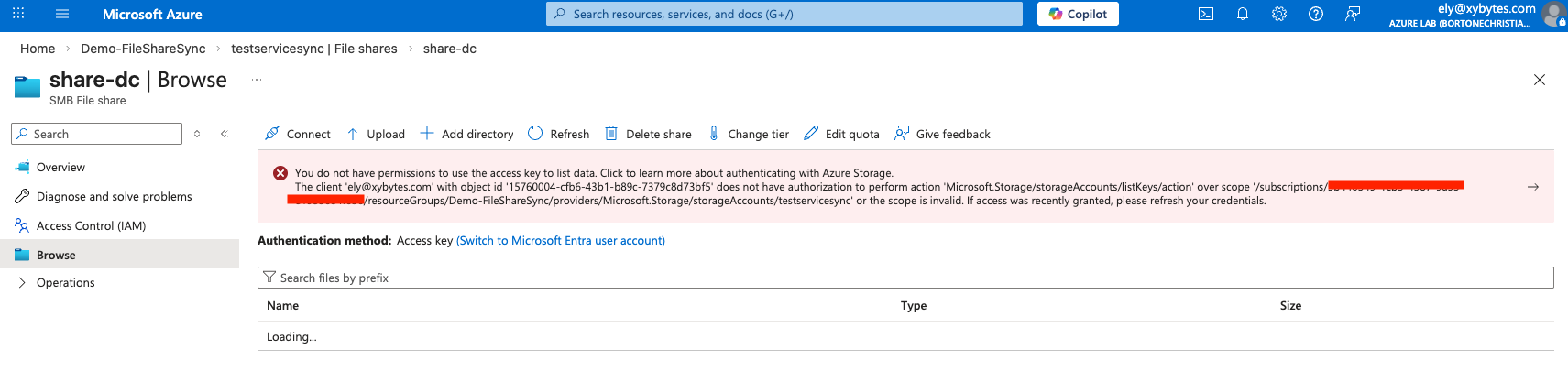
After that, I used the same user to assign myself the contributor role on the storage account. And just like that, the picture changed. The user could now not only manage the Azure File Sync setup, but also access the files being synchronized through the storage account.
That’s already a much broader level of access than many admins would probably expect from this role. But the really interesting part is what came next. Because the server endpoint can be reconfigured, I was able to point it to basically any folder on the server. Since the agent runs as SYSTEM, I chose C:\Windows\System32\config\, which contains sensitive files like SAM and SYSTEM.
Surprisingly, the agent synchronized them just fine.
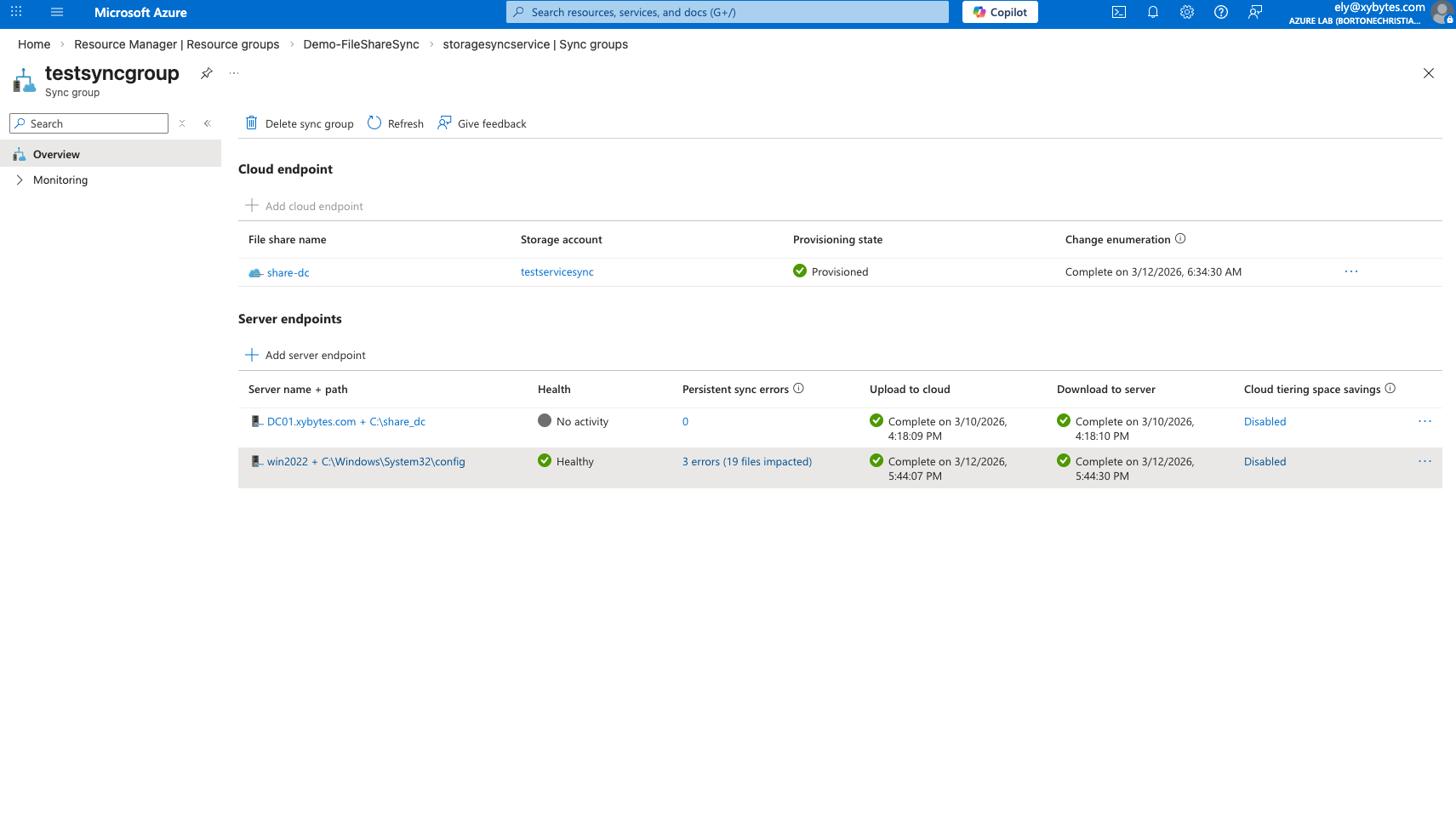
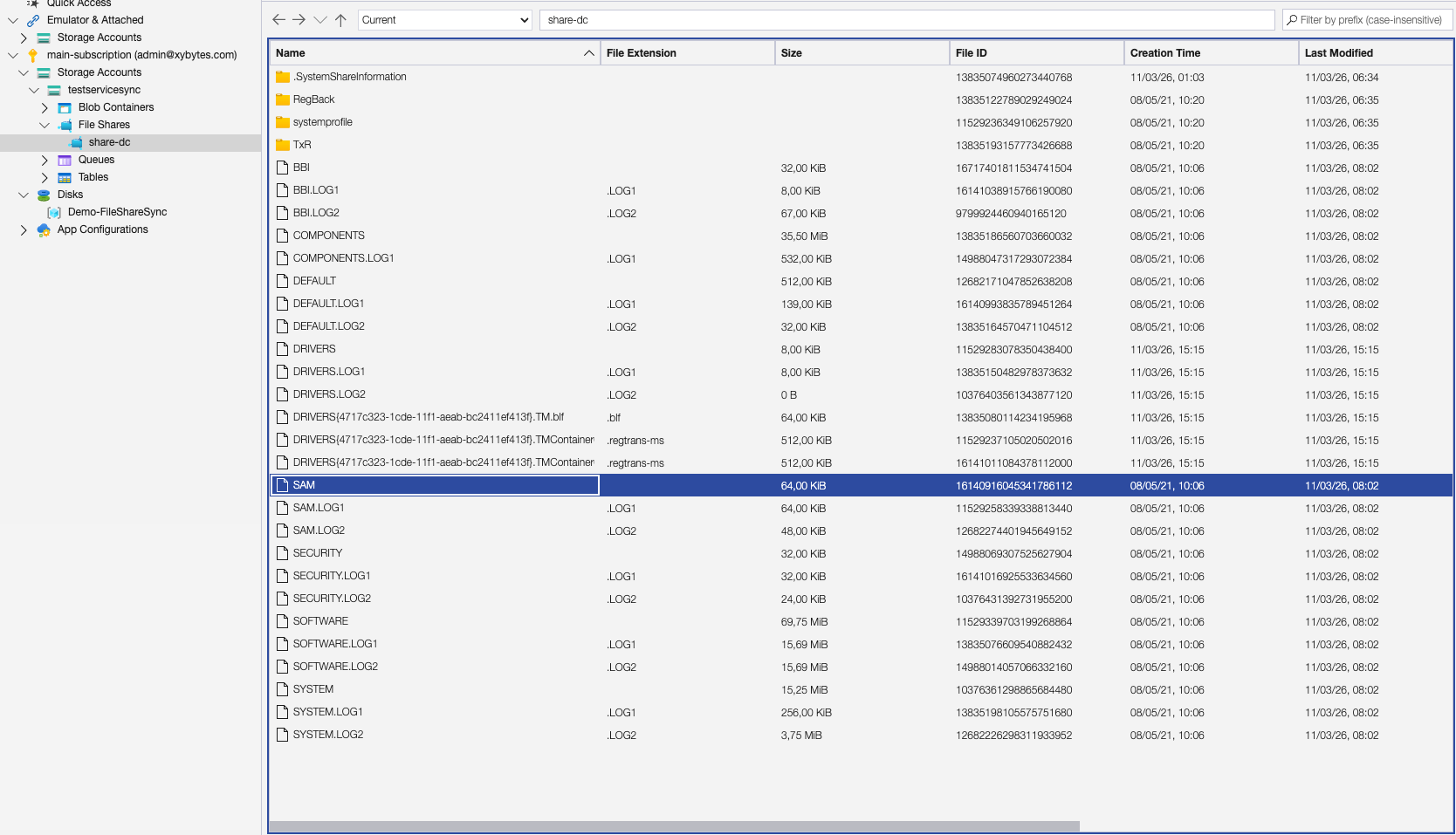
At that point, it became clear that this role could be abused for much more than Azure File Sync administration. It could effectively be used to pull sensitive files from the machine and potentially lead to full local administrator compromise.
Vendor Response
After reporting the issue to Microsoft, they classified it as a medium severity issue and chose not to address it. As a result, the responsibility shifts to defenders. If your environment uses Azure File Sync, the Azure File Sync Administrator role should be treated as far more powerful than its name suggests and restricted accordingly.